Every insight you need to win, from every document in your case.

Upload your case files. TrialIntel finds contradictions, builds timelines, generates cross-examination questions, and delivers intelligence reports — so you walk into court fully prepared.

Built for People in Active Litigation

Everything you need to understand your case and prepare for court.

Case Organization

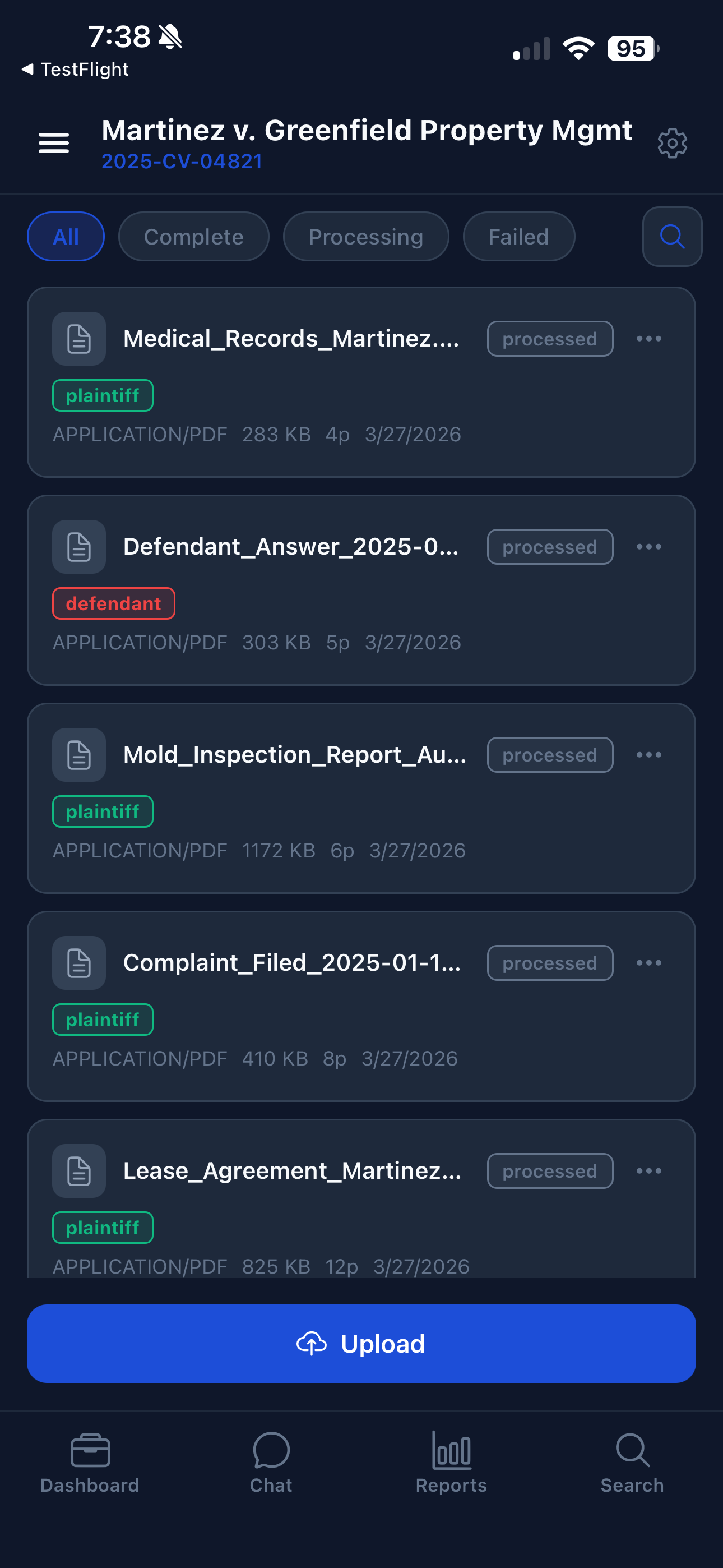
Upload PDFs, Word documents, images, and scanned files. TrialIntel automatically extracts text using OCR, classifies each document by type — pleadings, transcripts, exhibits, correspondence, court orders — and tags them by party (plaintiff, defendant, witness). Filter by processing status, search across all documents, and access every file with full metadata tracked: file size, type, upload date, and classification confidence.

AI-Powered Chat

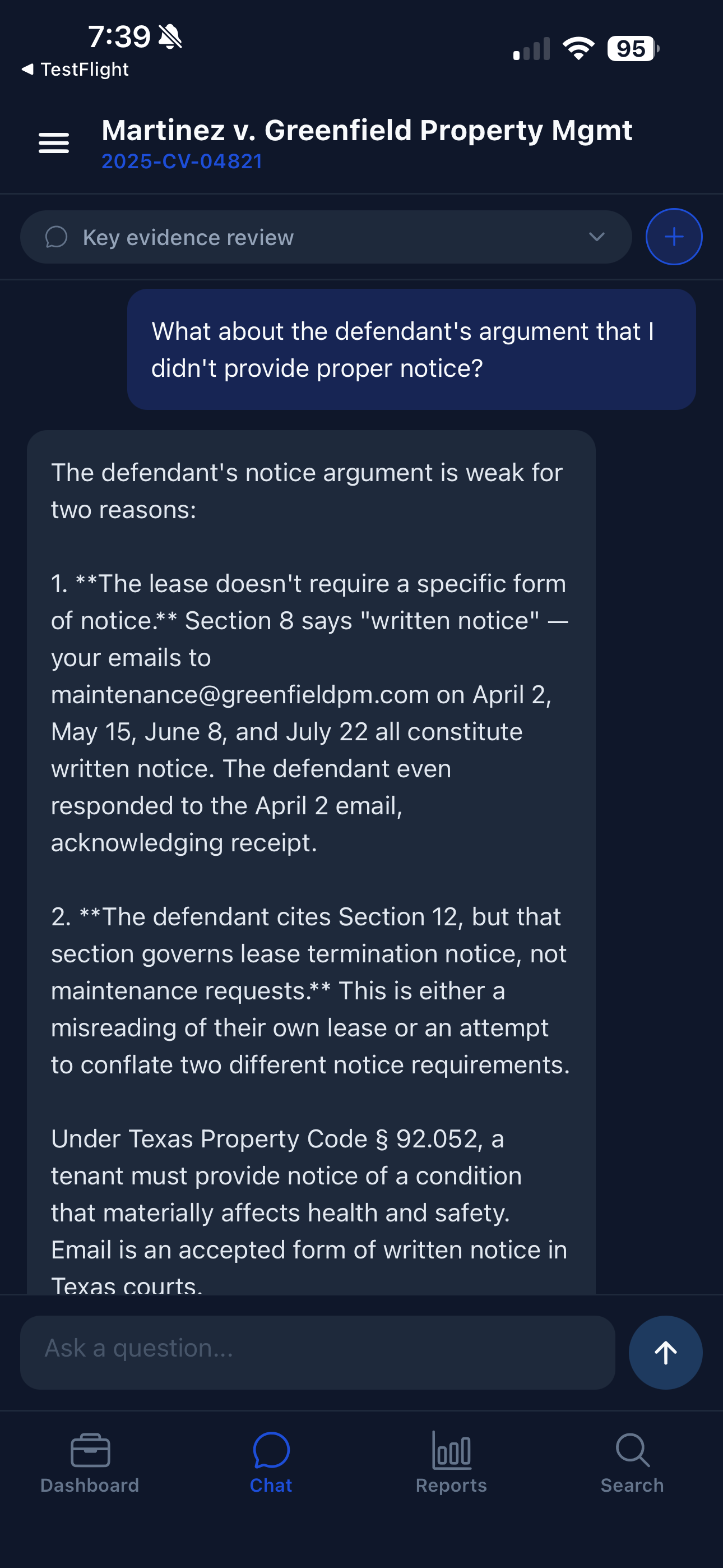
Ask questions about your case in plain English — "What did the defendant say about the April 2nd email?" — and receive detailed analysis sourced directly from your uploaded documents. Every answer cites specific files, page numbers, and relevant statutes. The AI draws connections across all your case materials simultaneously, surfacing insights that would take hours to find manually. Multiple chat sessions let you explore different angles of your case independently.

Timeline Generation

TrialIntel scans every document and automatically extracts dated events — filings, communications, incidents, deadlines — to build a chronological timeline of your entire case. Events are tagged with significance levels and linked back to their source documents. See the full arc of your case at a glance, spot gaps in the record, and identify sequences of events that strengthen or weaken specific claims.

Contradiction Detection

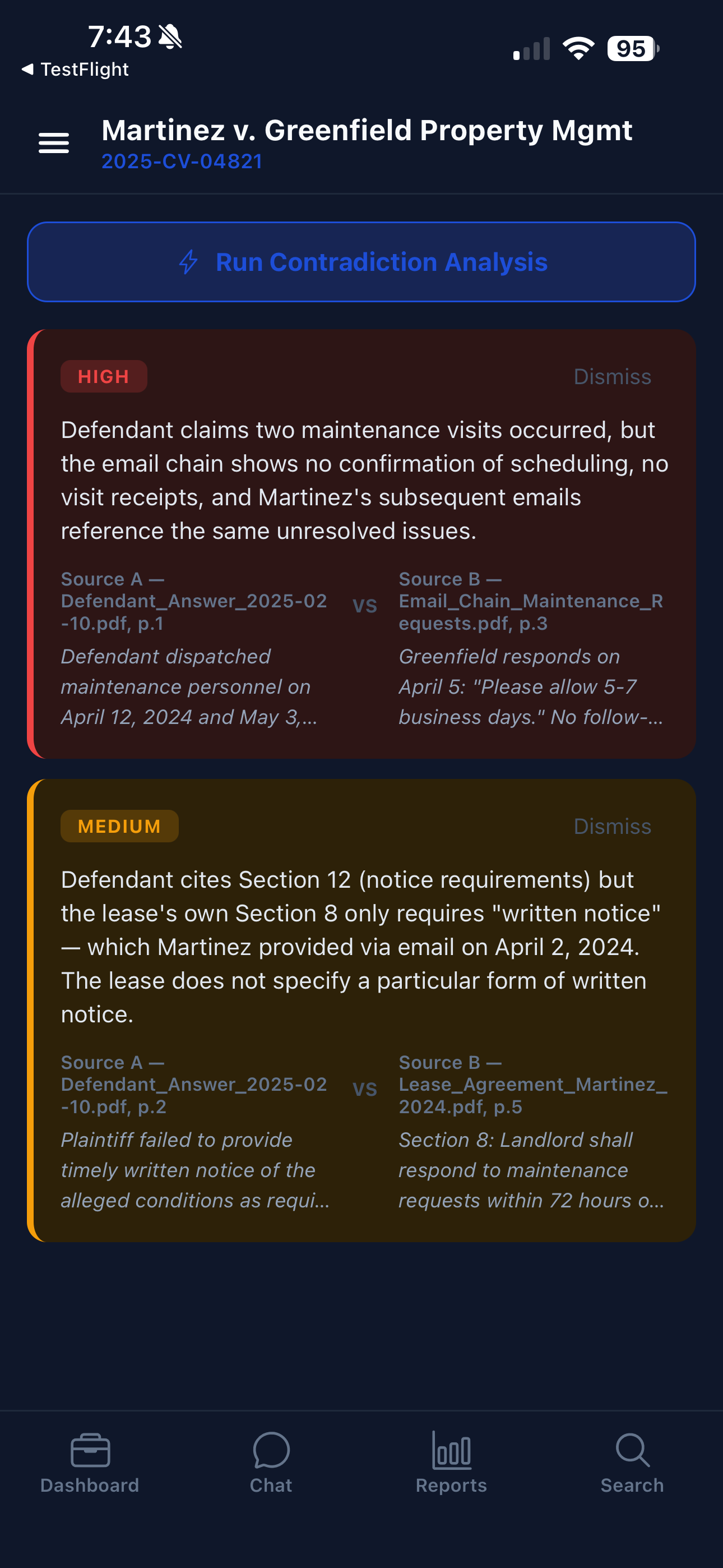
TrialIntel cross-references every statement, claim, and testimony across all your case documents to find inconsistencies. Each contradiction is rated by severity — HIGH, MEDIUM, or LOW — and shows the conflicting sources side-by-side with exact quotes and document references. Whether it's a witness who changed their story between a deposition and a filing, or a defendant whose timeline doesn't add up, you'll know exactly where the cracks are.

Cross-Examination Prep

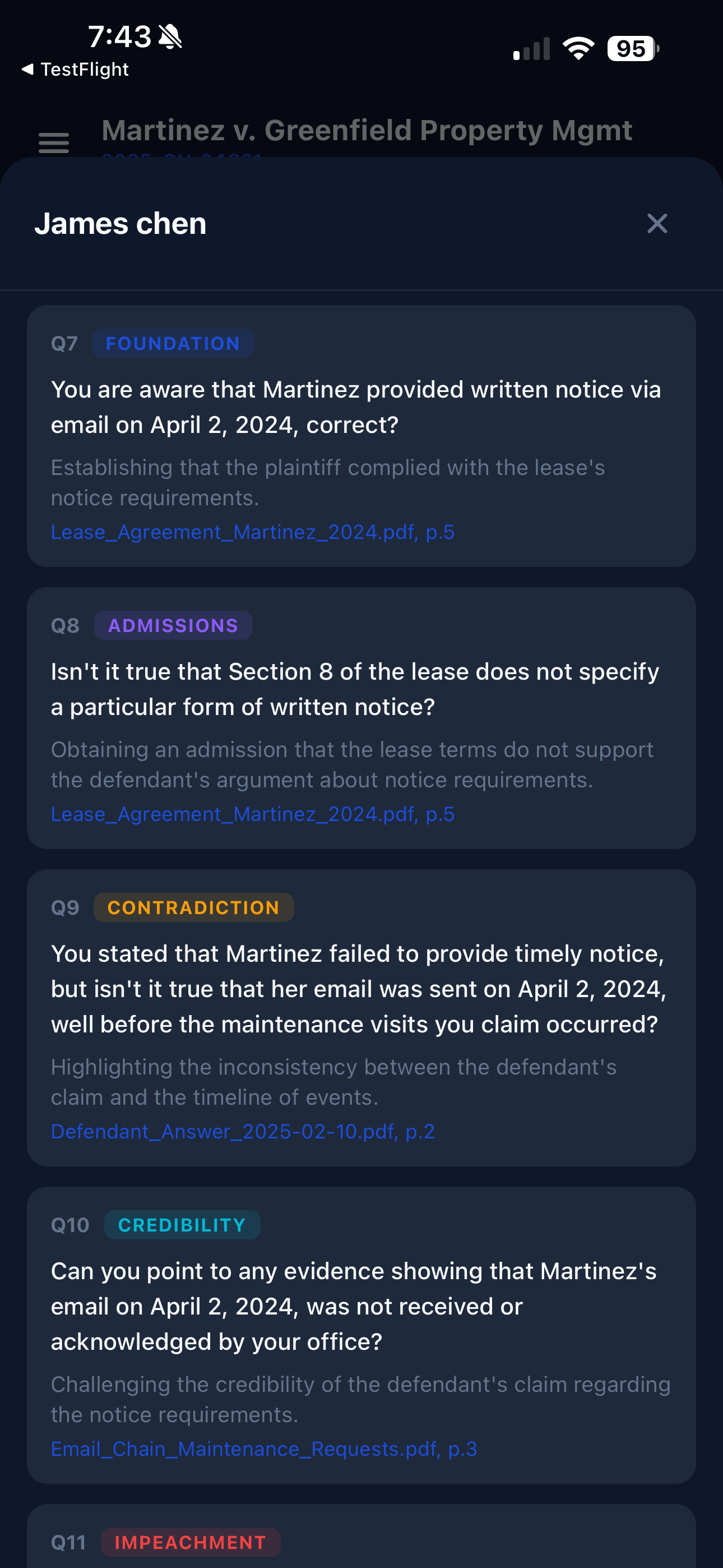
Generate targeted cross-examination questions for any witness in your case. Questions are organized by tactical type — Foundation, Admissions, Contradiction, Credibility, and Impeachment — each citing the exact source document and page. TrialIntel builds questions from the evidence itself: if a witness made conflicting statements, you'll get the precise questions to expose the inconsistency, with the citations to back them up in front of the judge.

Intelligence Reports

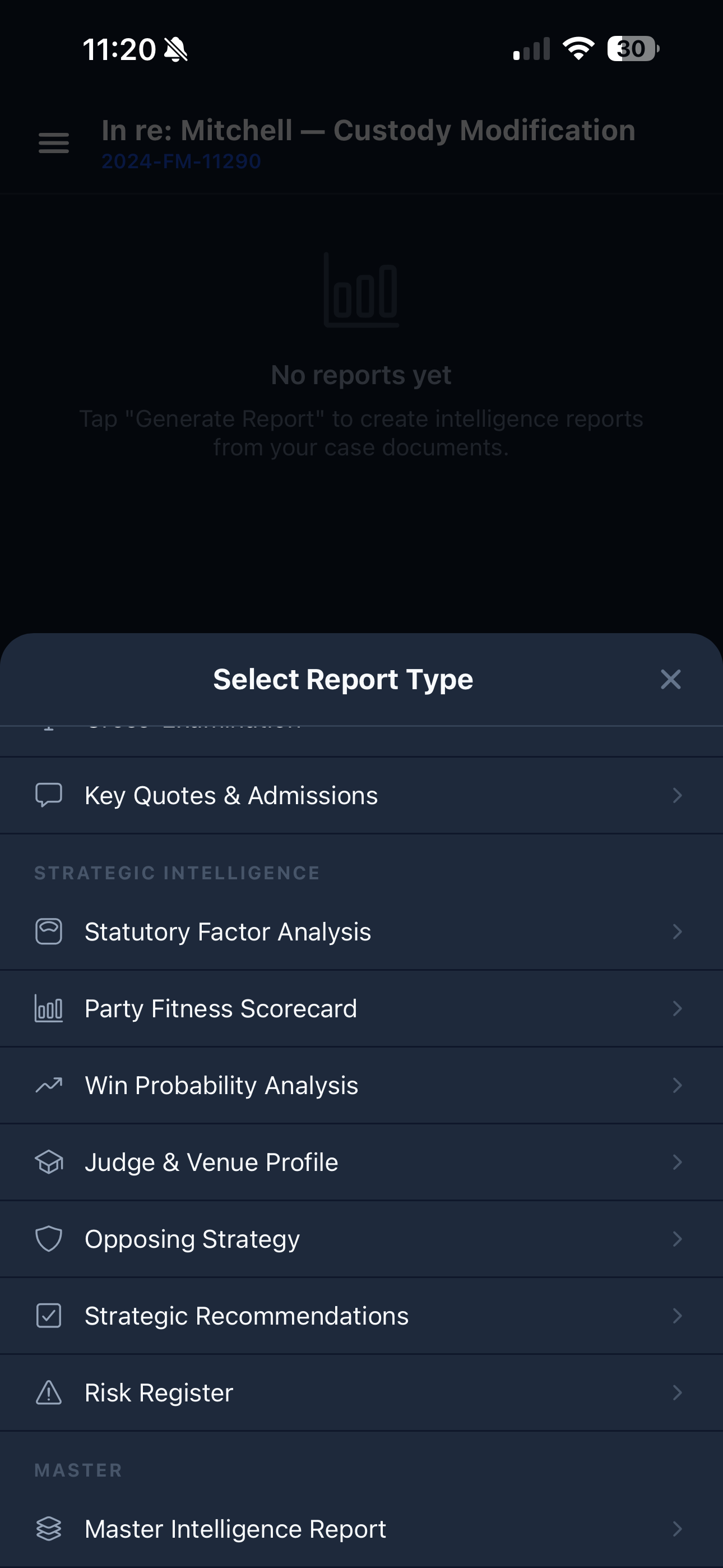
Choose from 10+ report types built specifically for litigation: Key Quotes & Admissions, Statutory Factor Analysis, Party Fitness Scorecard, Win Probability Analysis, Judge & Venue Profile, Opposing Strategy Assessment, Strategic Recommendations, Risk Register, and a comprehensive Master Intelligence Report. Every report is formatted for court, cites its sources, and can be exported as a PDF to share with your attorney or use at trial.

See It In Action

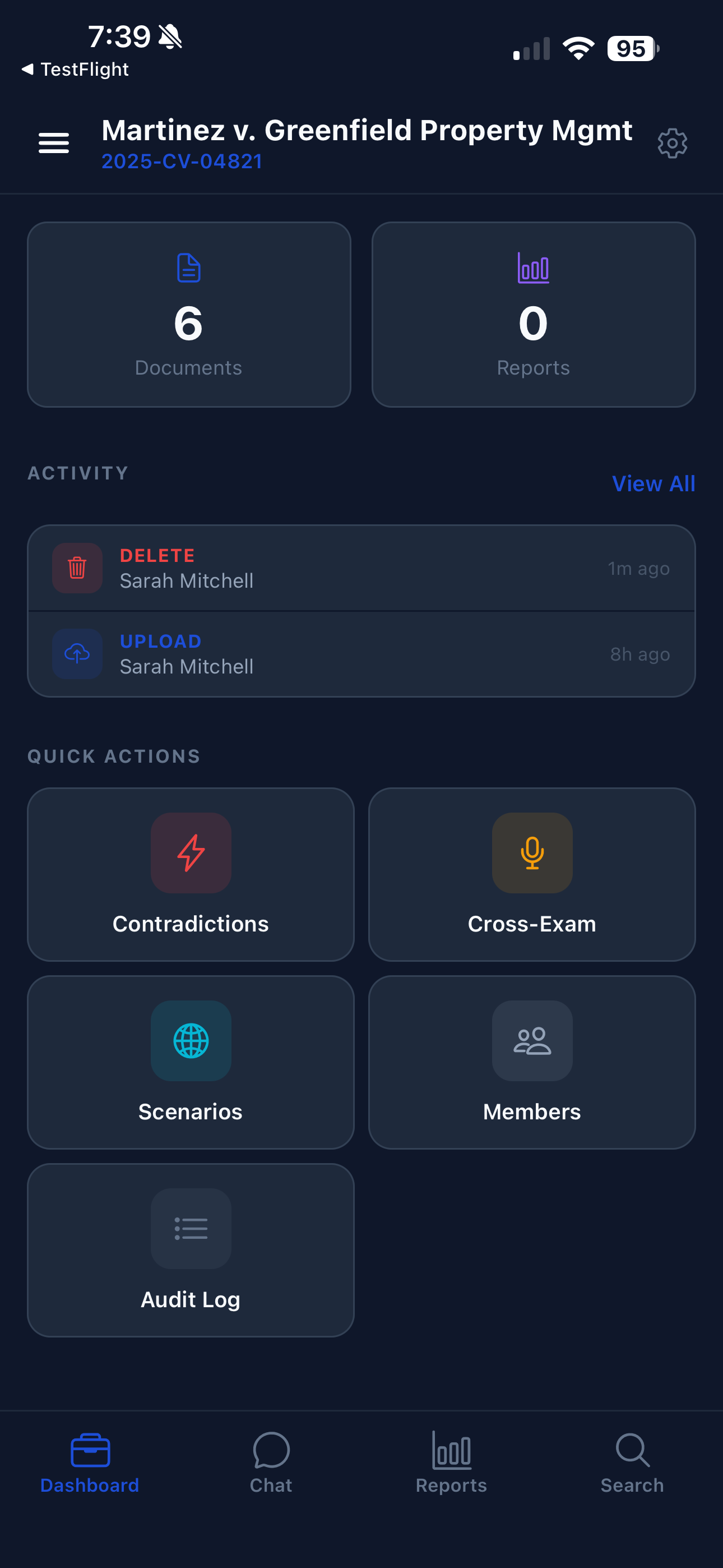
Real screens from the app — built for clarity under pressure.
How It Works

1

Upload Your Documents

PDFs, Word docs, images, audio — TrialIntel handles them all. Just upload and let the AI do the rest.

2

AI Analyzes Everything

People, dates, legal claims, contradictions, and timelines — extracted and organized automatically.

3

Walk Into Court Prepared

Reports, cross-exam questions, and evidence maps ready when you are. Review on your phone, anytime.

Simple, Transparent Pricing

Start with a 14-day free trial. No credit card required.

Starter

$19.99/mo
  • Up to 5 active cases
  • 150 documents per case
  • 300 AI chat messages / month
  • 15 report generations / month
  • Case timeline & activity log
  • 10 GB document storage
Start Free Trial

Attorney-Client Privilege, Protected by Design

TrialIntel is built for real litigation — which means handling privileged material with the care it demands.

Automatic Detection

Every document is scanned for privilege markers — "attorney-client privileged," "attorney work product," "privileged and confidential" — before any AI processing begins. If a match is found, processing halts immediately and you're notified.

You Stay in Control

When privilege is detected, you choose what happens next. Mark the document as privileged to permanently exclude it from AI processing, or confirm it's a false positive and continue. You can also pre-mark documents as privileged before upload.

Total AI Isolation

Privileged documents are architecturally excluded from all AI features — no text extraction, no classification, no search indexing, no chat access, no report generation. They're stored encrypted and viewable only by case members. It's not a filter; it's a wall.

Full Audit Trail

Every privilege action is logged — detection, marking, removal — with who did it, when, and which document. Your audit log is court-ready if you ever need to demonstrate how privileged material was handled.

Enterprise AI Privacy

All AI processing runs on Microsoft Azure OpenAI under an enterprise Data Processing Agreement with a no-training covenant. Your documents never train AI models. For attorneys directing AI-assisted analysis, this establishes the confidentiality framework recognized in United States v. Heppner.

Your Case Data is Protected

Enterprise-grade security and privacy by design.

Enterprise AI Privacy

Processed on Azure OpenAI with a Data Processing Agreement. Your documents never train AI models.

Privilege Detection

Attorney-client privileged documents are automatically detected and protected from AI processing.

Your Data, Your Control

GDPR and CCPA compliant. Delete your account and all data anytime from the app.

Encrypted Everything

TLS 1.2+ in transit, AES encryption at rest. JWT authentication with rotating tokens.